Automation for Siemens NX, built on the way you already work.
We build automation inside your NX environment: model and workholding creation, CAM programming, and the rest of your existing workflow. Your templates, machines, post processors and tool library stay in charge.
Built in a small shop, for our own parts
We are a small machine shop with limited resources, and that is what drove us to build the automation tools we now offer. Their impact is measured in the time you get back: hit cycle start on a new program and walk away.
Automate the workflow you already run
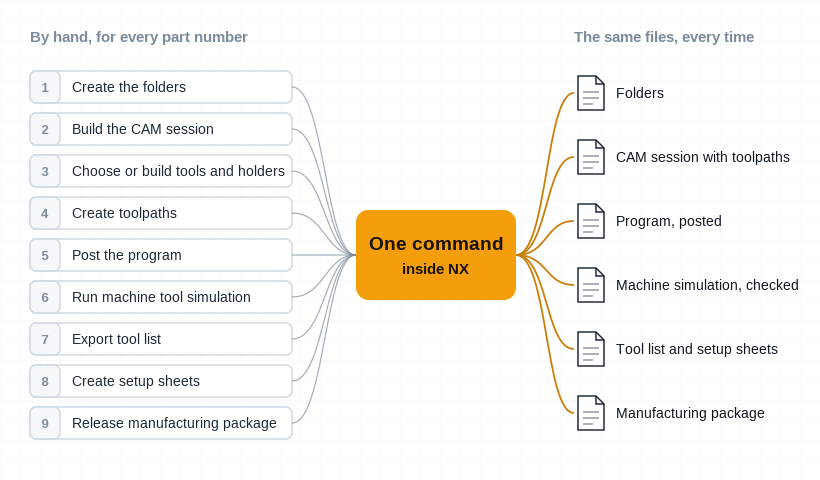
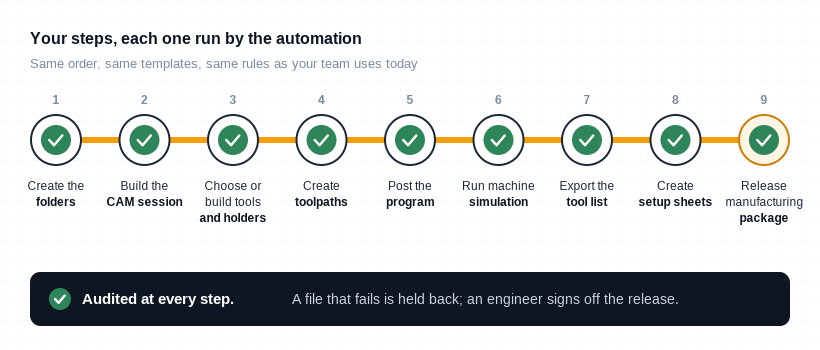
Most shops repeat the same steps for every part number. Work that has already been proven gets built again from scratch, and every new change has to be validated all over again. We automate those steps the way you do them today and turn them into one command inside NX. The result is the same set of files your team makes by hand, named and filed the same way.
- Your file naming rule and revision scheme
- Part number folder structure
- Your drawing template and tool list template
- Audits for verification that hold a file back when it fails
CAM programming for new part numbers
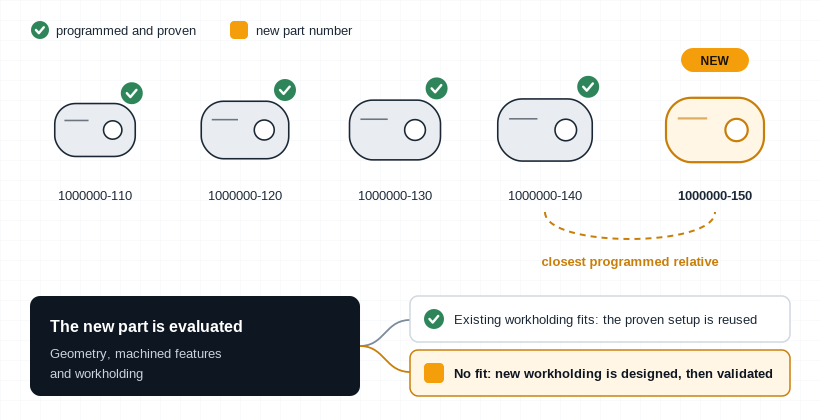
When a new part joins a family you already make, it shouldn’t start from a blank CAM session. Why start from scratch when the work has already been done? We automate that workflow and use your proven toolpaths and methods as the starting point.
Every new part is evaluated first, workholding included. If the existing workholding fits, the proven setup is reused. If it does not, new workholding is designed for the part and goes through the same validation.
One new part, model to simulated and posted program: 56 seconds of NX time in our demonstration.
Modeling, revisions and drawings
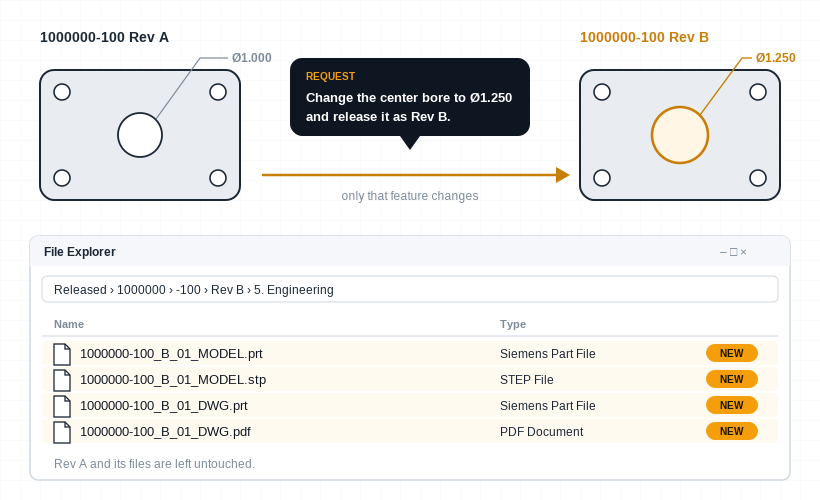
New revisions that keep the design intent of the old one, built as editable features an engineer can change. Drawings started from your company template and delivered as PDF. Scans turned into feature-based solids, checked against the scan.
Measured on our own parts
These are times we recorded running the automation on our own work. They are NX working time on the first run. Engineering review is extra, and it is the step we never remove.
| Job | What comes out | Time |
|---|---|---|
| New member of a 5-axis part family | CAM session, 5 tool paths, full machine simulation, posted program, tool list, filed folders | 56 s |
| One hundred new members the same way | The same set of files for each partProjected from the measured time of each step | ≈ 1 h 33 min |
| Drawing from the company template | Views, minimal dimensions, notes, title block, PDF | 1 min 16 s |
| Scan to solid: 300,000 scan facets | One solid, 153 faces from 184 editable features | 53 s |
| Studio rendering from the CAD model | Ray-traced pictures of the exact geometry | 1 to 3 min |
What it could save you
Put in your own numbers. The automated side uses the measured NX time above plus the review time you choose for each part.
About 1,356 programming hours back each year, worth about $129,000.
Programming hours per month. Automated time is 1 minute of NX time per part plus your review time. This is an estimate for planning a conversation, not a quote.
How an engagement runs
You keep your NX version, your libraries and your post processors. We fit the automation to them.
Workflow review
We sit with your team and see how a part flows from modeling to machined today.
Capture and build
We capture that workflow and build the integration into the NX version you already run.
Validate
The system is proven on your own parts, and the workflow is refined until the output is right.
Grow your capacity
Proven programs are ready sooner than your machines can run them. Plan for more machines.
Strong integration, light footprint
Minimally invasive
The automation works with your part nomenclature, folder structure and data management as they are. It can add to them where you want it to, but it does not replace them or ask you to change how you work.
Nothing reaches the machine without validation
Nothing reaches the machine that has not gone through the validation process. Every posted program runs in the real NX machine tool simulation against the machine, fixture, holder, tool and stock, and anything flagged is listed for an engineer before the program is filed.
Native files, nothing proprietary
You get NX parts with full feature history, CAM sessions you can open and edit, posted NC programs, Excel tool lists and PDF drawings. No viewer or licence of ours is needed to use them.
People stay in the loop
The automation does the repetitive work. Your programmer reviews the result, signs off the release and decides what gets changed.
What does your team spend the most time on?
Tell us what your programmers or machinists spend the most time doing. We will tell you what can be automated, and how much more time you will have for productive work.